Login Page in Swing with Database connectivity.
Hello Guys!
Here , The code of Login Page are written in Swing. Which is given Below :-
But before using this code you create a Database " Student " and Table " login ".
after then you create two columns in login table.
1. Username
2. Password
Then use this code and compile & run your program.
File Name :- Login.java
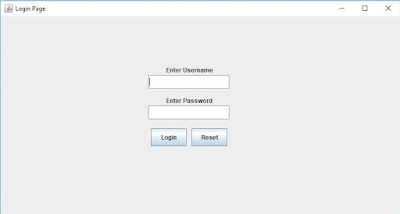
Here , The code of Login Page are written in Swing. Which is given Below :-
But before using this code you create a Database " Student " and Table " login ".
after then you create two columns in login table.
1. Username
2. Password
Then use this code and compile & run your program.
File Name :- Login.java
import javax.swing.*;

import java.awt.*;

import java.awt.event.*;

import java.sql.*;


public class Login implements ActionListener

{

 private JFrame f;

 private JPanel panel;

 private JLabel l1;

    private JLabel l2;

 private JTextField tf1;

 private JTextField tf2;

 private JButton b1;

 private JButton b2;

 private JLabel l3;


 public Login()

 {

  loginFrame();

 }

 public void actionPerformed(ActionEvent ae)

 {

  tf1.setText(" ");

  tf2.setText(" ");

 }

 private void loginFrame()

 {

  f=new JFrame("Login Page");

  panel=new JPanel(null);


  l1=new JLabel("Enter Username ");

  tf1=new JTextField(15);

  l2=new JLabel("Enter Password ");

  tf2=new JTextField(15);

  b1=new JButton("Login");

  b2=new JButton("Reset");


  panel.add(l1);

  panel.add(tf1);

  panel.add(l2);

  panel.add(tf2);

  panel.add(b1);

  panel.add(b2);


  l1.setBounds(75,0,100,50);

  tf1.setBounds(40,35,160,28);

  l2.setBounds(75,60,100,50);

  tf2.setBounds(40,95,160,28);


  b1.setBounds(45,140,70,35);

  b2.setBounds(125,140,70,35);


        panel.setBounds(250,80,250,300); // it is use to set the position and size of JComponent.


  Color color = UIManager.getColor("JFrame.background"); //it is use to pick a default color from background.

  panel.setBackground(color);


  b1.addActionListener(new ActionListener()

  {

        public void actionPerformed(ActionEvent ae)

     {

            jButton1ActionPerformed(ae);

        }

        }

  );


  b2.addActionListener(this);


        f.add(panel);

  f.setDefaultCloseOperation(JFrame.EXIT_ON_CLOSE);

  f.setSize(800,500);

  f.setLayout(null);

  f.setVisible(true);


 }


 private void jButton1ActionPerformed(ActionEvent ae)

 {

  try

        {

            Class.forName("com.mysql.jdbc.Driver");

            Connection con=DriverManager.getConnection("jdbc:mysql://localhost:3306/Student","root","");

            Statement stmt=con.createStatement();

            String str="select * from login where username='"+tf1.getText()+"' and password='"+tf2.getText()+"';";

            System.out.println(str);

            ResultSet rs=stmt.executeQuery(str);


            if(rs.next())

            {

                JOptionPane.showMessageDialog(null,"Record Found");


            }

            else

            {

                JOptionPane.showMessageDialog(null,"Login Failed");

            }


        }

        catch(Exception e)

        {

            JOptionPane.showMessageDialog(null,e.getMessage());

        }


 }

 public static void main(String []args)

 {

          new Login();

 }

}

Comments
Post a Comment